XRechnung required fields: checklist with BT numbers and BR-DE rules
Official references
Use these sources to verify dates, formats, and official rule changes.
Related Technical Wiki
Explore deep-dive developer documentation and regulatory guidelines matching this article.
XRechnung Business Terms and Groups (BT and BG), with field requirements, validation rules, and examples.
How XRechnung applies EN 16931 in Germany, including XML syntax, validation, buyer references, and delivery channels.
Required seller, buyer, invoice, currency, and line data.
XRechnung is the German specification of the European invoice standard EN 16931. A field can be optional in EN 16931 and still be required by a German BR-DE rule. The table below lists the fields that the KoSIT validator requires for every XRechnung 3.0.2 invoice, with the rule that fails when the field is missing. Each BT number links to its field page.
To check an existing file, use our free XRechnung validator. The KoSIT error code guide explains the rules that fail most often.
Required fields at a glance
Rules come from the KoSIT configuration v2026-08-31 (XRechnung 3.0.2, EN 16931 validation artefacts 1.3.16). Conditional rows apply only in the stated case, for example for a VAT category, a payment means or a document-level allowance. Not listed are fields inside the payee (BG-10), invoice line periods (BG-26), invoice line allowances and charges (BG-27, BG-28), item identifier schemes (BG-31) and item attributes (BG-32). The table covers the base XRechnung CIUS, not the Clean Vehicles extension (CVD): its rules BR-DE-CVD-01 and BR-DE-CVD-02 also require BT-12 and BT-17, and BR-DE-CVD-03, BR-DE-CVD-04 and BR-DE-CVD-05 require a vehicle category on an invoice line (BT-158 with scheme CVD, BT-160 and BT-161).
Interactive map
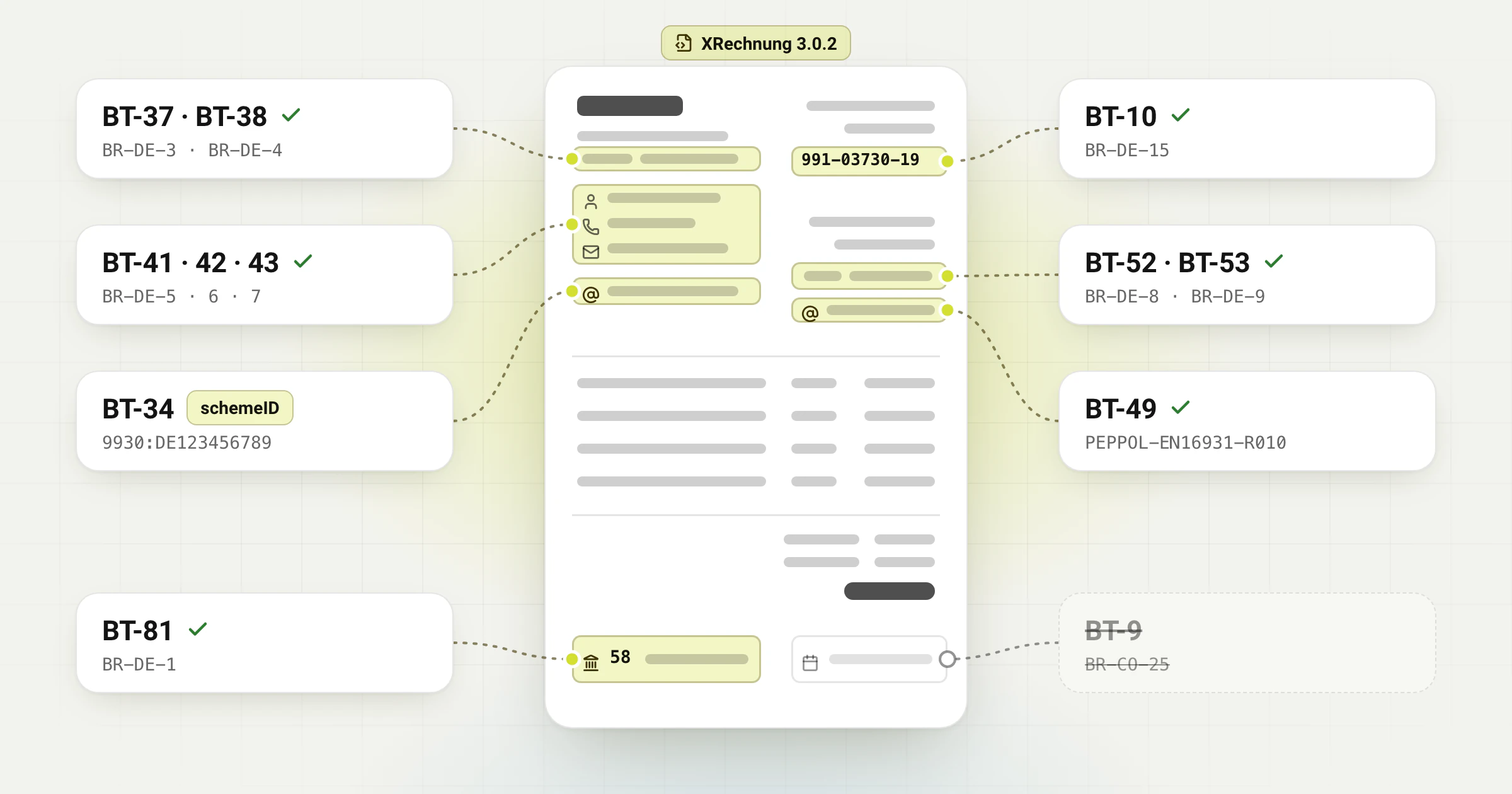
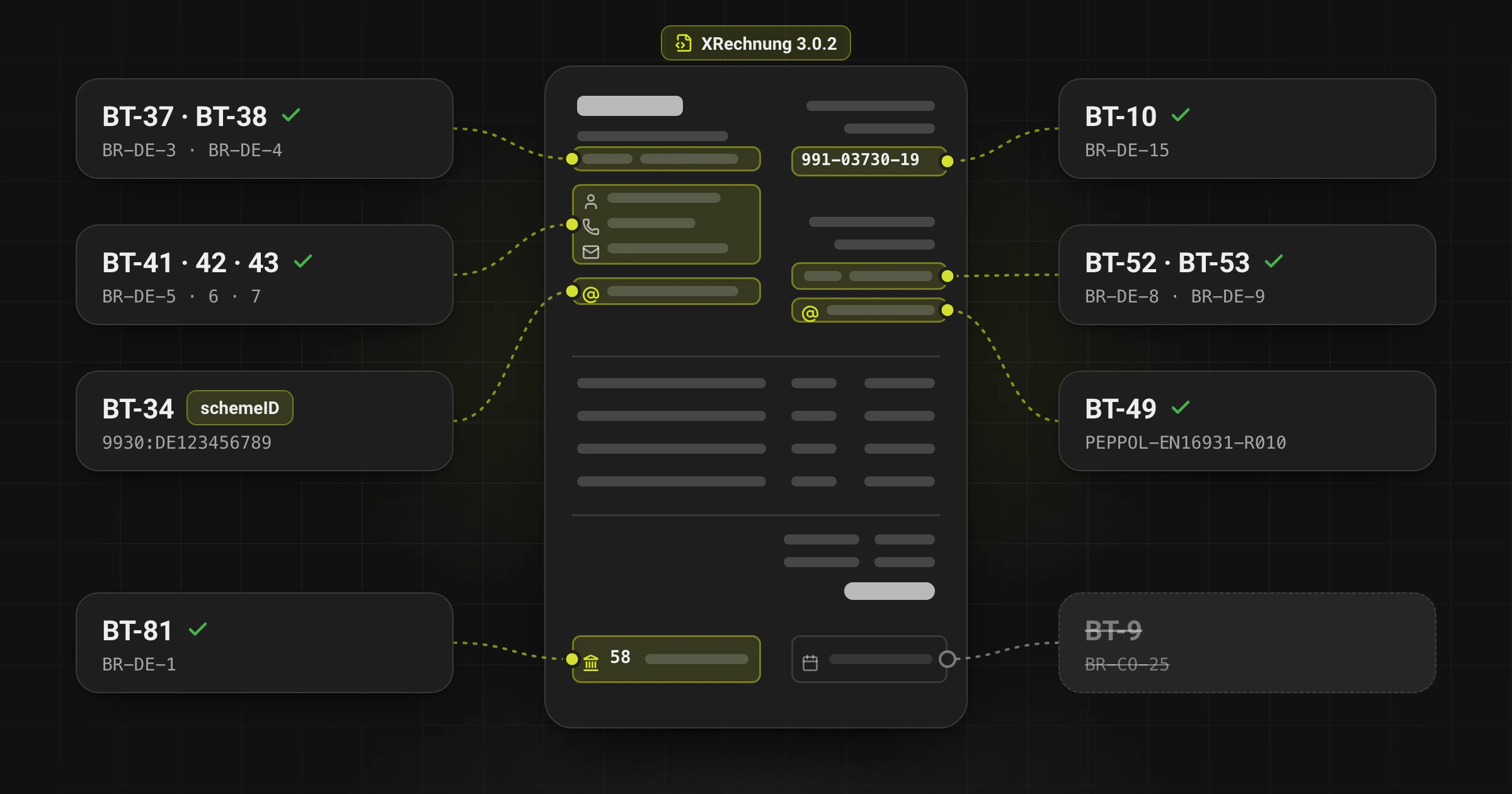
Where the XRechnung required fields sit
Tap a part of the invoice to list its required fields and the rule that makes each one mandatory.
fields on every invoice
of them only by XRechnung rules
more in certain cases
Seller
8 always required · +7 in certain cases
| BT | Field | Rule | Required |
|---|---|---|---|
BT-1 | Invoice Number | BR-02 | Mandatory |
BT-2 | Invoice Issue Date | BR-03 | Mandatory |
BT-3 | Invoice Type Code | BR-04 | Mandatory |
BT-5 | Invoice Currency Code | BR-05 | Mandatory |
BT-10 | Buyer Reference | BR-DE-15 | Mandatory |
BT-23 | Business Process Type Identifier | PEPPOL-EN16931-R001 | Mandatory |
BT-24 | Specification Identifier | BR-01 | Mandatory |
BT-25 | Preceding invoice reference | BR-55 | Conditional: for each preceding invoice reference (BG-3), for example in a corrected invoice (BR-55) |
BT-27 | Seller Name | BR-06 | Mandatory |
BT-29 | Seller identifier | BR-CO-26 | Conditional: on every invoice at least one of BT-29, BT-30 or BT-31 (BR-CO-26) |
BT-30 | Seller legal registration identifier | BR-CO-26 | Conditional: on every invoice at least one of BT-29, BT-30 or BT-31 (BR-CO-26) |
BT-31 | Seller VAT Identifier | BR-CO-26, BR-DE-16, BR-S-02, BR-Z-02, BR-E-02, BR-AE-02, BR-IC-02, BR-G-02 | Conditional: on every invoice at least one of BT-29, BT-30 or BT-31 (BR-CO-26); with VAT category S, Z, E or AE (BR-S/Z/E/AE-02) and L or M (BR-DE-16): BT-31, BT-32 or BT-63 in BG-11; with K or G (BR-IC-02, BR-G-02): BT-31 or BT-63; not with O (BR-O-02) |
BT-32 | Seller tax registration identifier | BR-DE-16, BR-S-02, BR-Z-02, BR-E-02, BR-AE-02 | Conditional: alternative to BT-31 or BT-63 with VAT category S, Z, E or AE (BR-S/Z/E/AE-02) and L or M (BR-DE-16); not enough with K or G (BR-IC-02, BR-G-02) |
BT-34 | Seller Electronic Address | PEPPOL-EN16931-R020, BR-62 | Mandatory |
BT-37 | Seller City | BR-DE-3 | Mandatory |
BT-38 | Seller Post Code | BR-DE-4 | Mandatory |
BT-40 | Seller Country Code | BR-09 | Mandatory |
BT-41 | Seller contact point | BR-DE-5 | Mandatory |
BT-42 | Seller contact telephone number | BR-DE-6 | Mandatory |
BT-43 | Seller contact email address | BR-DE-7 | Mandatory |
BT-44 | Buyer Name | BR-07 | Mandatory |
BT-47 | Buyer legal registration identifier | BR-AE-02 | Conditional: with VAT category AE, if BT-48 is not given (BR-AE-02) |
BT-48 | Buyer VAT Identifier | BR-IC-02, BR-AE-02 | Conditional: with VAT category K (BR-IC-02); with AE, BT-48 or BT-47 (BR-AE-02); not with O (BR-O-02) |
BT-49 | Buyer Electronic Address | PEPPOL-EN16931-R010, BR-63 | Mandatory |
BT-52 | Buyer City | BR-DE-8 | Mandatory |
BT-53 | Buyer Post Code | BR-DE-9 | Mandatory |
BT-55 | Buyer Country Code | BR-11 | Mandatory |
BT-62 | Seller tax representative name | BR-18 | Conditional: if a seller tax representative (BG-11) is given (BR-18) |
BT-63 | Seller tax representative VAT identifier | BR-56 | Conditional: if a seller tax representative (BG-11) is given (BR-56); not with VAT category O (BR-O-02) |
BT-69 | Tax representative country code | BR-20 | Conditional: if a seller tax representative (BG-11) is given (BR-20) |
BT-73 | Invoicing period start date | BR-CO-19 | Conditional: if an invoicing period (BG-14) is given: BT-73 or BT-74 (BR-CO-19) |
BT-74 | Invoicing period end date | BR-CO-19 | Conditional: if an invoicing period (BG-14) is given: BT-73 or BT-74 (BR-CO-19) |
BT-72 | Actual delivery date | BR-IC-11 | Conditional: with VAT category K: BT-72 or an invoicing period (BG-14) |
BT-77 | Deliver to city | BR-DE-10 | Conditional: if a deliver-to address (BG-15) is given |
BT-78 | Deliver to post code | BR-DE-11 | Conditional: if a deliver-to address (BG-15) is given |
BT-80 | Deliver to country code | BR-IC-12, BR-57 | Conditional: with VAT category K, or if a deliver-to address (BG-15) is given |
BT-81 | Payment means type code | BR-DE-1, BR-49 | Mandatory |
BT-84 | Payment account identifier | BR-DE-23-a, BR-50, BR-61 | Conditional: if BT-81 is 30 or 58 (credit transfer) |
BT-87 | Payment card primary account number | BR-DE-24-a | Conditional: with card payment (BG-18), which codes 48, 54 or 55 in BT-81 require (BR-DE-24-a); at most the first 6 and last 4 digits (BR-51) |
BT-89 | Mandate reference identifier | PEPPOL-EN16931-R061, BR-DE-25-a | Conditional: if BT-81 is 49 or 59 (direct debit, BG-19) (PEPPOL-EN16931-R061, BR-DE-25-a) |
BT-90 | Bank assigned creditor identifier | BR-DE-30 | Conditional: with direct debit (BG-19): code 59 in BT-81 requires it (BR-DE-25-a), code 49 through the mandate reference BT-89 (PEPPOL-EN16931-R061) |
BT-91 | Debited account identifier | BR-DE-31 | Conditional: with direct debit (BG-19): code 59 in BT-81 requires it (BR-DE-25-a), code 49 through the mandate reference BT-89 (PEPPOL-EN16931-R061) |
BT-92 | Document level allowance amount | BR-31 | Conditional: for each document-level allowance (BG-20) |
BT-93 | Document level allowance base amount | PEPPOL-EN16931-R041 | Conditional: for a document-level allowance with a percentage (BT-94) (PEPPOL-EN16931-R041) |
BT-94 | Document level allowance percentage | PEPPOL-EN16931-R042 | Conditional: for a document-level allowance with a base amount (BT-93) (PEPPOL-EN16931-R042) |
BT-95 | Document level allowance VAT category code | BR-32 | Conditional: for each document-level allowance (BG-20) |
BT-96 | Document level allowance VAT rate | BR-S-06, BR-Z-06, BR-E-06, BR-AE-06, BR-IC-06, BR-G-06, BR-AF-06, BR-AG-06 | Conditional: for each document-level allowance (BG-20), with VAT category S or L (above 0; for L, UBL also accepts 0), Z, E, AE, K, G (0) or M (0 or above); not with O |
BT-97 | Document level allowance reason | BR-33, BR-CO-21 | Conditional: for each document-level allowance (BG-20): BT-97 or BT-98 |
BT-98 | Document level allowance reason code | BR-33, BR-CO-21 | Conditional: for each document-level allowance (BG-20): BT-97 or BT-98 |
BT-99 | Document level charge amount | BR-36 | Conditional: for each document-level charge (BG-21) |
BT-100 | Document level charge base amount | PEPPOL-EN16931-R041 | Conditional: for a document-level charge with a percentage (BT-101) (PEPPOL-EN16931-R041) |
BT-101 | Document level charge percentage | PEPPOL-EN16931-R042 | Conditional: for a document-level charge with a base amount (BT-100) (PEPPOL-EN16931-R042) |
BT-102 | Document level charge VAT category code | BR-37 | Conditional: for each document-level charge (BG-21) |
BT-103 | Document level charge VAT rate | BR-S-07, BR-Z-07, BR-E-07, BR-AE-07, BR-IC-07, BR-G-07, BR-AF-07, BR-AG-07 | Conditional: for each document-level charge (BG-21), with VAT category S or L (above 0; for L, UBL also accepts 0), Z, E, AE, K, G (0) or M (0 or above); not with O |
BT-104 | Document level charge reason | BR-38, BR-CO-22 | Conditional: for each document-level charge (BG-21): BT-104 or BT-105 |
BT-105 | Document level charge reason code | BR-38, BR-CO-22 | Conditional: for each document-level charge (BG-21): BT-104 or BT-105 |
BT-106 | Sum of Invoice Line Net Amount | BR-12 | Mandatory |
BT-109 | Invoice Total Amount Without VAT | BR-13 | Mandatory |
BT-110 | Invoice Total VAT Amount | BR-CO-15, PEPPOL-EN16931-R053 | Mandatory |
BT-111 | Invoice total VAT amount in accounting currency | BR-53, PEPPOL-EN16931-R054 | Conditional: if a VAT accounting currency (BT-6) is given (BR-53) |
BT-112 | Invoice Total Amount With VAT | BR-14 | Mandatory |
BT-115 | Amount Due for Payment | BR-15 | Mandatory |
BT-116 | VAT Category Taxable Amount | BR-45 | Mandatory |
BT-117 | VAT Category Tax Amount | BR-46 | Mandatory |
BT-118 | VAT Category Code | BR-47 | Mandatory |
BT-119 | VAT Category Rate | BR-DE-14 | Mandatory |
BT-120 | VAT Exemption Reason Text | BR-E-10, BR-AE-10, BR-IC-10, BR-G-10, BR-O-10 | Conditional: BT-120 or BT-121 in the VAT breakdown for VAT category E, AE, K, G or O; not with S, Z, L or M |
BT-121 | VAT Exemption Reason Code | BR-E-10, BR-AE-10, BR-IC-10, BR-G-10, BR-O-10 | Conditional: BT-120 or BT-121 in the VAT breakdown for VAT category E, AE, K, G or O; not with S, Z, L or M |
BT-122 | Supporting Document Reference | BR-52 | Conditional: for each additional supporting document (BG-24) (BR-52) |
BT-126 | Invoice line identifier | BR-21 | Mandatory |
BT-129 | Invoice line quantity | BR-22 | Mandatory |
BT-130 | Invoice line quantity unit of measure code | BR-23 | Mandatory |
BT-131 | Invoice line net amount | BR-24 | Mandatory |
BT-146 | Item Net Price | BR-26 | Mandatory |
BT-151 | Invoice Line VAT Category Code | BR-CO-04 | Mandatory |
BT-152 | Invoice Line VAT Category Rate | BR-S-05, BR-Z-05, BR-E-05, BR-AE-05, BR-IC-05, BR-G-05, BR-AF-05, BR-AG-05 | Conditional: on every invoice line with VAT category S or L (above 0; for L, UBL also accepts 0), Z, E, AE, K, G (0) or M (0 or above); not with O |
BT-153 | Invoice Line Item Name | BR-25 | Mandatory |
BT-35 is optional: it is the first seller address line. Do not reject an otherwise complete address only because BT-35 is empty. The delivery note number (BT-16) is optional as well.
The German BR-DE rules in groups
Seller contact: BR-DE-2 requires SELLER CONTACT (BG-6). BR-DE-5 requires the seller contact point (BT-41), BR-DE-6 the telephone number (BT-42) and BR-DE-7 the e-mail address (BT-43). BR-DE-27 and BR-DE-28 add warnings: the number should contain at least three digits, the e-mail address exactly one @. In CII, give BT-41 as a person name or as a department, not both (CII-SR-465).
Addresses: BR-DE-3 and BR-DE-4 require the seller city (BT-37) and post code (BT-38); BR-DE-8 and BR-DE-9 require the same for the buyer (BT-52, BT-53). A deliver-to address (BG-15) needs its city and post code too.
Buyer reference: BR-DE-15 requires the Buyer reference (BT-10). KoSIT checks only that the field is present, not its format. For a public buyer, enter the routing reference it gave you, usually a Leitweg-ID; for a business customer, ask which reference they expect. Do not invent one. Invoice-Converter.com warns in the review step when a Leitweg-ID in BT-10 has a wrong check digit.
Tax identifiers: BR-DE-16 applies when the invoice uses VAT category S, Z, E, AE, K, G, L or M. It then needs the seller VAT identifier (BT-31), the seller tax registration identifier (BT-32) or a seller tax representative (BG-11), whose VAT identifier (BT-63) BR-56 requires. For category K or G, the EN 16931 rules BR-IC-02 and BR-G-02 accept only BT-31 or BT-63; BT-32 alone fails.
Payment: BR-DE-1 requires payment instructions (BG-16) with a payment means code (BT-81). The code decides the next group: 30 or 58 (credit transfer) needs BG-17 with the account in BT-84 (BR-DE-23-a), 48, 54 or 55 (card) needs BG-18 (BR-DE-24-a), and 59 (direct debit) needs BG-19 (BR-DE-25-a); with code 49 or 59, PEPPOL-EN16931-R061 also requires the mandate reference (BT-89). With code 58, BR-DE-19 warns when BT-84 is not a valid IBAN.
Electronic addresses need a scheme
BT-34 and BT-49 are optional in EN 16931. Despite their Peppol names, KoSIT checks PEPPOL-EN16931-R020 (seller electronic address, BT-34) and PEPPOL-EN16931-R010 (buyer electronic address, BT-49) as errors for every XRechnung, not only for Peppol. BR-62 and BR-63 then require the scheme identifier (schemeID).
9930:DE123456789 is one seller endpoint example (scheme 9930 with a German VAT identifier), not a fixed XRechnung value. An e-mail address uses scheme EM, a Leitweg-ID scheme 0204. Use the identifiers that the buyer and the seller actually use for e-invoices.
Invoice-Converter.com creates and checks the XRechnung file. It does not send invoices and is not a Peppol access point.
BT-9 and BT-20 are no longer required for an amount due
Older checklists list the payment due date (BT-9) or the payment terms (BT-20) as required when an amount is due. That was rule BR-CO-25. The EN 16931 validation artefacts 1.3.16, which the KoSIT configuration v2026-08-31 uses, removed it. Give BT-9 or BT-20 when you agreed them. Cash discount (Skonto) terms in BT-20 must follow the format of BR-DE-18.
Final check before sending
Invoice-Converter.com converts a PDF invoice into XRechnung, shows these fields in the review step and checks the result with KoSIT before the download.
- Confirm the recipient, the channel and the required profile.
- Check source values against the invoice, especially tax identifiers, bank details and totals.
- Generate the UBL or CII XML and run the matching KoSIT configuration.
- Correct the source data and generate again. Review uncertain source fields manually.
Frequently asked questions
Which fields are mandatory in an XRechnung?
Besides the EN 16931 core (invoice number BT-1, issue date BT-2, type code BT-3, currency BT-5, specification identifier BT-24, seller and buyer names and countries, totals, VAT breakdown and invoice lines), XRechnung requires BT-10, the seller city and post code (BT-37, BT-38), the seller contact (BT-41 to BT-43), the buyer city and post code (BT-52, BT-53), the electronic addresses BT-34 and BT-49, payment instructions (BG-16) and the VAT rate BT-119. Most VAT categories also need a seller tax identifier (BT-31, BT-32 or BG-11; for K and G, BT-31 or BT-63).
Is the delivery note number mandatory in XRechnung?
No. The despatch advice reference (BT-16), which holds the delivery note number, is optional in EN 16931 and in XRechnung. Add it when the buyer asks for it, for example to match the invoice with the delivery.
What is the XRechnung format?
XRechnung is the German specification (CIUS) of the European e-invoicing standard EN 16931. An XRechnung is an XML file in UBL or UN/CEFACT CII syntax without a visual PDF part. KoSIT publishes the specification and the validator configuration; the current version is XRechnung 3.0.2.
Is there an English version of XRechnung?
XRechnung is a data format, not a language. The XML element names are English, and XRechnung does not prescribe a language for free-text fields such as item names or notes. In a KoSIT report, the German BR-DE rule messages are in German and the EN 16931 rule messages are in English.
Ready to convert your invoices?
Convert PDF invoices to XRechnung, ZUGFeRD, and other formats. Subscriptions from €10/month with annual billing (excl. taxes), with a 3-day trial on your first subscription. Or without a subscription: €5 per conversion (excl. taxes).
Try it free without an account, up to 6 PDF pages per conversion, attachments included. Only the download costs: it needs an account and one credit or a subscription.