Convert PDF to ZUGFeRD: when a hybrid invoice workflow fits
Official references
Use these sources to verify dates, formats, and official rule changes.
Related Technical Wiki
Explore deep-dive developer documentation and regulatory guidelines matching this article.
ZUGFeRD and Factur-X hybrid invoices: PDF/A-3 with embedded CII/XML, profile levels (MINIMUM to EXTENDED), validation, and when to choose ZUGFeRD vs pure XML for Germany and EU B2B.
A practical guide to PDF/A-3, PDF/X-3, and why ZUGFeRD and Factur-X hybrid invoices need an archival PDF container with embedded XML.
Compare ZUGFeRD profiles (MINIMUM, BASIC WL, BASIC, EN 16931, EXTENDED) and choose the right one for your workflow.
This guide is for teams that still start from PDF invoices but need a hybrid e-invoice with both a human-readable document and structured XML.
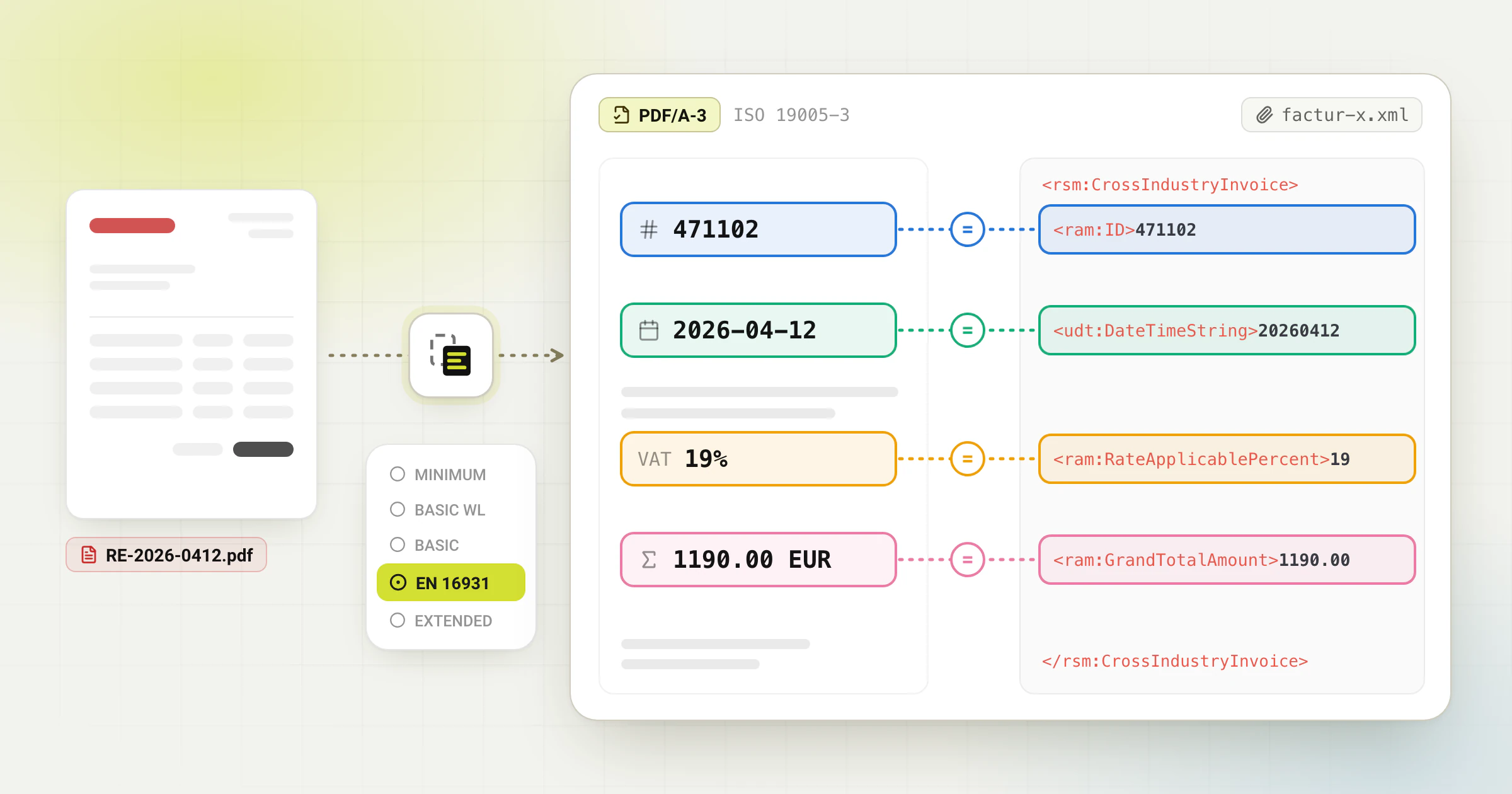
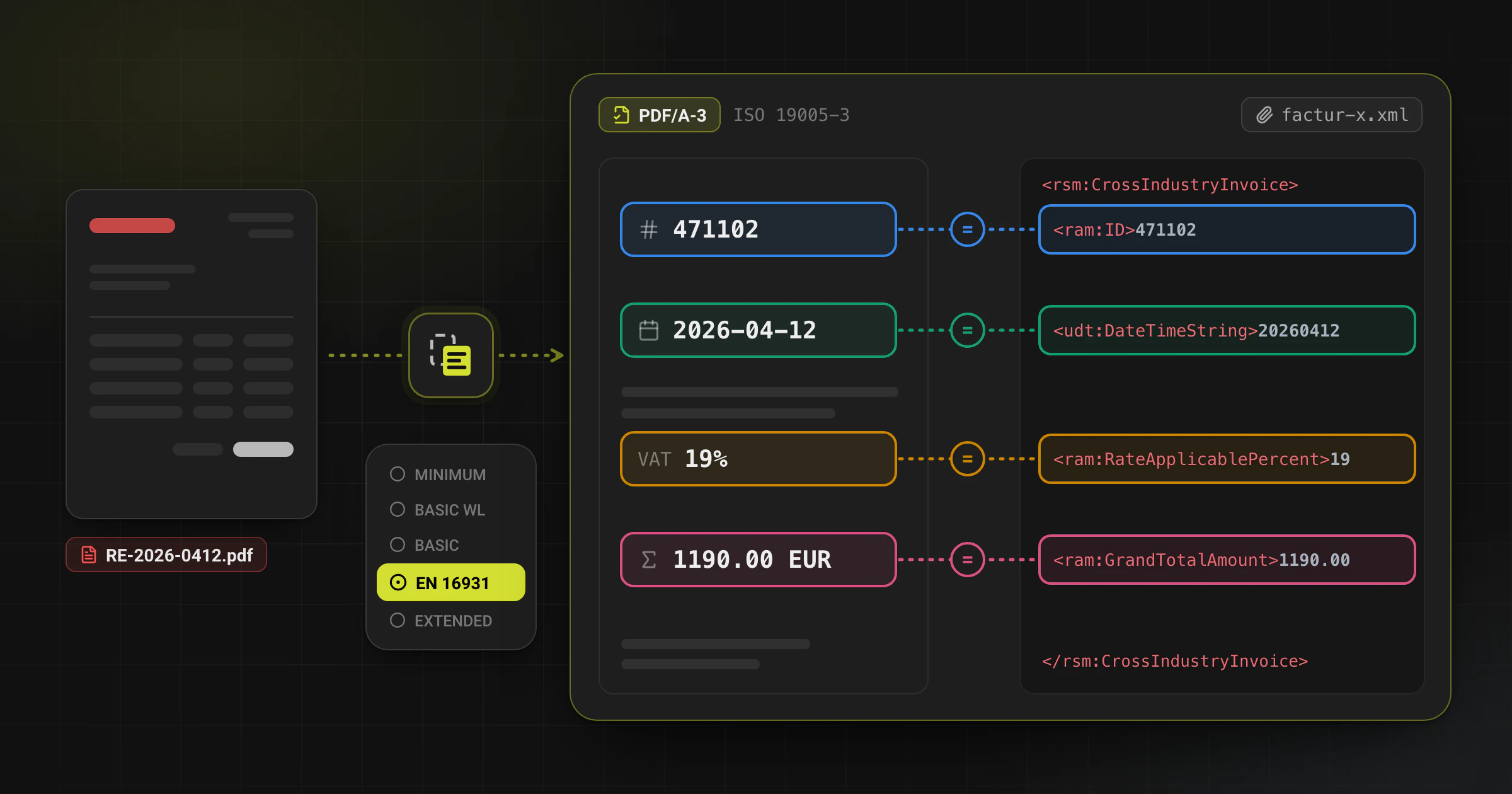
ZUGFeRD remains useful in 2026 when the recipient process accepts a PDF/A-3 invoice with embedded structured data. The format combines a human-readable PDF with machine-readable XML for automated import, validation, archiving, and matching. The result still needs review before delivery.
When ZUGFeRD is the better choice than pure XML
Choose ZUGFeRD when the recipient workflow uses a readable PDF and also benefits from machine-readable invoice data for import or validation.
If the buyer or submission channel explicitly requires XRechnung, Peppol BIS Billing, or another XML exchange format, generate that target format directly. Do not assume that a ZUGFeRD PDF is accepted everywhere.
What a compliant ZUGFeRD output must contain
Interactive anatomy
What is inside a ZUGFeRD / Factur-X invoice
One PDF/A-3 file, five layers. Click or tap a layer, or switch the profile, to see what each part holds and which check catches its errors.
Embedded profile
Embedded XML
XSD + Schematron- file
- factur-x.xml
- syntax
- UN/CEFACT CII
- BT-24
- urn:cen.eu:en16931:2017
What it holds
The invoice data in UN/CEFACT CII syntax. Its specification identifier (BT-24) names the profile. Older files: zugferd-invoice.xml (ZUGFeRD 2.0), ZUGFeRD-invoice.xml (ZUGFeRD 1.0).
What goes wrong
Schema errors, broken business rules such as totals that do not add up, or a profile that differs from the XMP metadata.
What catches it
The XSD and Schematron of the selected profile. The XRECHNUNG profile must also pass the XRechnung rules of the KoSIT validator.
- A PDF/A-3 file with embedded XML that matches the selected ZUGFeRD 2.5 profile.
- The same invoice identity, parties, line items, totals, VAT details, and payment information in the visual and XML layers, where applicable.
- A profile that matches the recipient and use case, rather than simply the easiest profile to generate.
- Validation of both the PDF container and the embedded XML before the file is archived or delivered.
Recommended workflow from PDF to ZUGFeRD
- Upload the PDF and review the extracted parties, invoice dates, tax logic, and line items.
- Choose the right ZUGFeRD profile for the recipient and use case before generating the file.
- Generate the hybrid invoice and validate the PDF/A-3 container and XML against the expected profile rules.
- Review the visual PDF and the structured data together so mismatches are caught before delivery.
- Archive or send the file only after the team resolves profile, data, or validation exceptions.
Common failure points
- Choosing a profile that does not cover the recipient workflow.
- Assuming the PDF preview proves that the embedded XML is correct.
- Omitting tax exemption reasons or payment information required by the selected profile.
- Skipping validation because the hybrid invoice “looks fine” in a PDF viewer.
Frequently asked questions
Is ZUGFeRD better than XRechnung for every German invoice?
No. ZUGFeRD is useful when a readable PDF and embedded XML are both valuable. If the recipient or submission process requires XRechnung or another XML format, generate that format directly.
Do I still need to validate a ZUGFeRD file if the PDF looks correct?
Yes. A PDF that looks correct does not prove that the embedded XML or the PDF/A-3 container is valid. Validate both against the expected profile and business rules.
Can conversion remove the need for review?
No. Conversion accelerates data capture, but profile choice, tax edge cases, low-quality PDFs, and validation failures still require human review.
Ready to convert your invoices?
Convert PDF invoices to XRechnung, ZUGFeRD, and other formats. Subscriptions from €10/month with annual billing (excl. taxes), with a 3-day trial on your first subscription. Or without a subscription: €5 per conversion (excl. taxes).
Try it free without an account, up to 6 PDF pages per conversion, attachments included. Only the download costs: it needs an account and one credit or a subscription.