PDF/A-3 Technical Guide: Embedding ZUGFeRD & Factur-X XML for Compliance
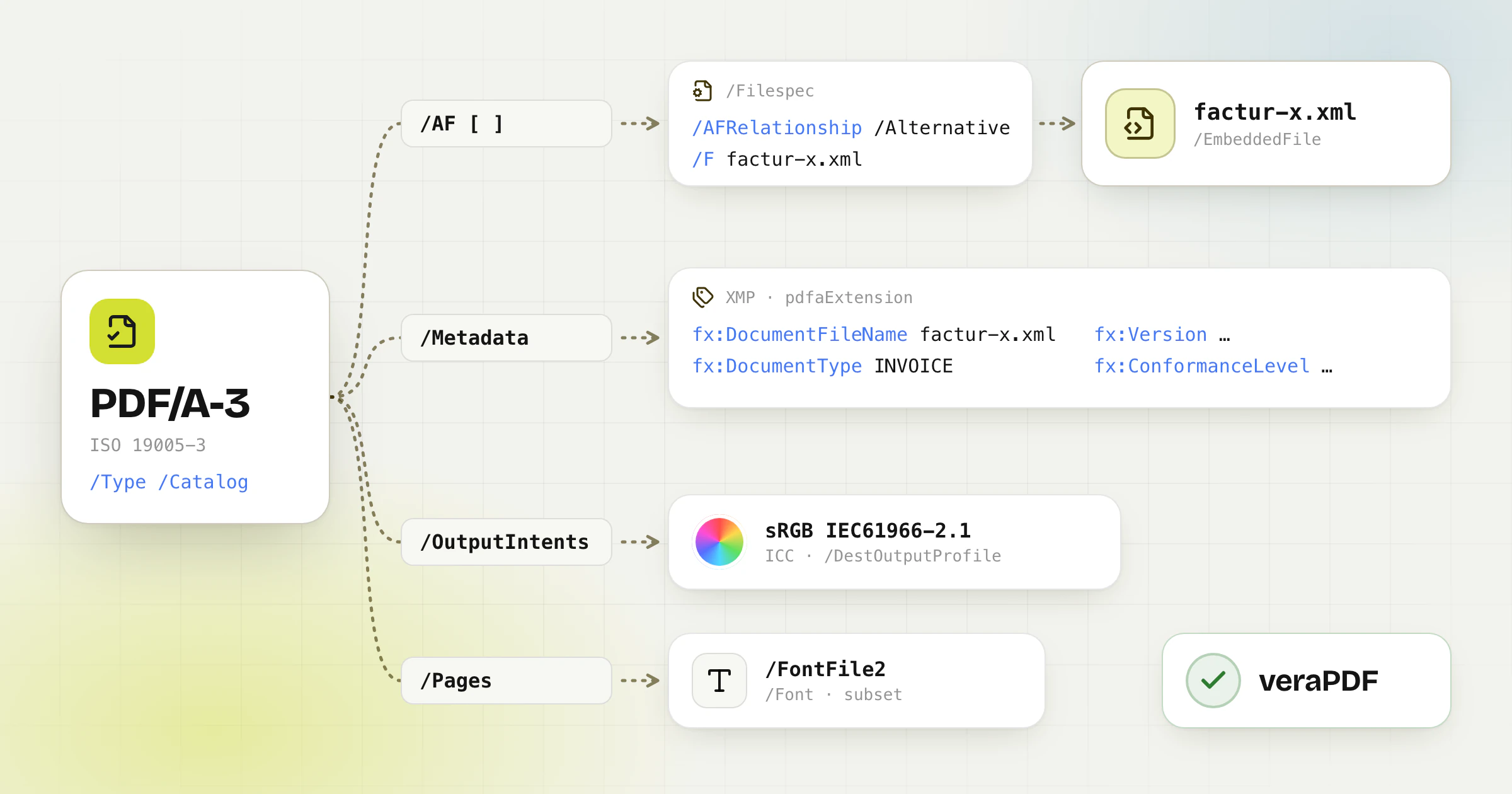
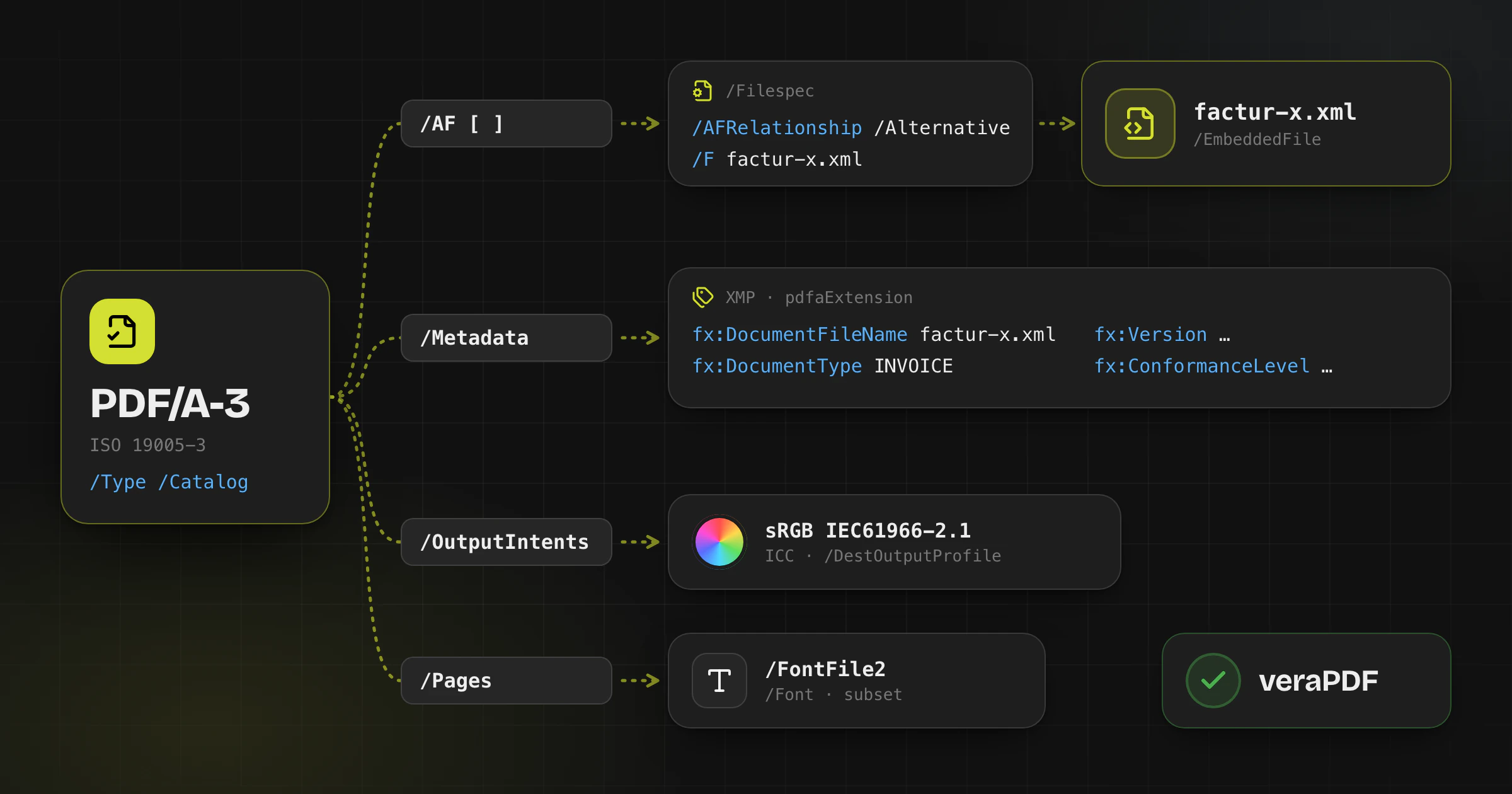
Hybrid e-invoices such as ZUGFeRD and Factur-X use a PDF/A-3 file (ISO 19005-3) as the visual document and embed the structured invoice XML alongside it.
For software engineers, PDF-library developers, and validation teams, producing a conforming file means getting the PDF/A rules, associated-file metadata, XMP extension schema, and font and color requirements right.
Core Architecture: How PDF/A-3 Differs from PDF/A-2
Interactive anatomy
What is inside a ZUGFeRD / Factur-X invoice
One PDF/A-3 file, five layers. Click or tap a layer, or switch the profile, to see what each part holds and which check catches its errors.
Embedded profile
Attachment link (/AF)
PDF/A validator (veraPDF)- /AF
- → factur-x.xml
- /AFRelationship
- /Data · /Source · /Alternative
- /Subtype
- /text#2Fxml
What it holds
An /AF array in the document catalog that points to the embedded file, with its relationship to the PDF and the MIME type text/xml.
What goes wrong
The XML is added as an ordinary attachment without /AF, or with a relationship the profile does not allow.
What catches it
veraPDF reports embedded files without an associated-file relationship. MINIMUM and BASIC WL use Data; from BASIC, Data, Source or Alternative.
- File attachments: PDF/A-2 permits embedded files only under its more limited rules. PDF/A-3 permits associated files of arbitrary formats, including XML, when the required PDF/A metadata is present.
- Associated Files (`/AF`): The document Catalog, or an individual Page when appropriate, can carry an `/AF` array that points to file-specification dictionaries and their embedded-file streams.
- AFRelationship: Each associated file must declare an `/AFRelationship` value, such as `/Alternative` or `/Data`, describing how it relates to the PDF representation.
- Attachment name: Factur-X and current ZUGFeRD specifications use `factur-x.xml` for the embedded invoice XML. Do not substitute a different name without checking the exact profile and version specification.
XMP Metadata Extension Schema Requirements
PDF/A-3 validators such as veraPDF inspect the XMP metadata packet referenced by the document Catalog. A Factur-X or ZUGFeRD file must declare the format namespace through the PDF/A extension schema, using the namespace and property definitions from the applicable release.
The invoice extension properties include DocumentFileName (`factur-x.xml`), DocumentType (`INVOICE`), Version, and ConformanceLevel. The allowed profile values depend on the specification version, so use the exact release values rather than assuming that every version has the same list.
Font Subsetting & Color Space Rules
- Font embedding: Every font used by the visual document must be embedded. Subsetting is allowed when the resulting font program and character mappings remain valid.
- Color profile (OutputIntent): A PDF/A-3 file must provide an OutputIntent with an ICC profile suitable for the document, such as sRGB IEC61966-2.1, so rendering is reproducible across systems.
- Validation tools: Run veraPDF for PDF/A-3 and the official FeRD/Factur-X XSD and Schematron rules for the invoice profile before release. They check different layers of conformance and semantic invoice rules. The ZUGFeRD validator on Invoice-Converter.com runs both checks in one upload of the hybrid PDF: XSD and Schematron of the detected profile, and PDF/A-3b with veraPDF. It also checks that the PDF embeds the XML with the Factur-X metadata. It does not compare the visible PDF with the XML.
Official Technical References
Frequently asked questions
What happens if the XMP metadata namespace is missing?
The file may still open, but a validator will report a conformance error. An attached XML file alone is not enough: the PDF/A extension schema and the Factur-X or ZUGFeRD properties must also match the applicable specification version.
Ready to convert your invoices?
Upload your PDF invoice, review the extracted details without signing in, and download a validated XRechnung, ZUGFeRD, Factur-X, or UBL file.